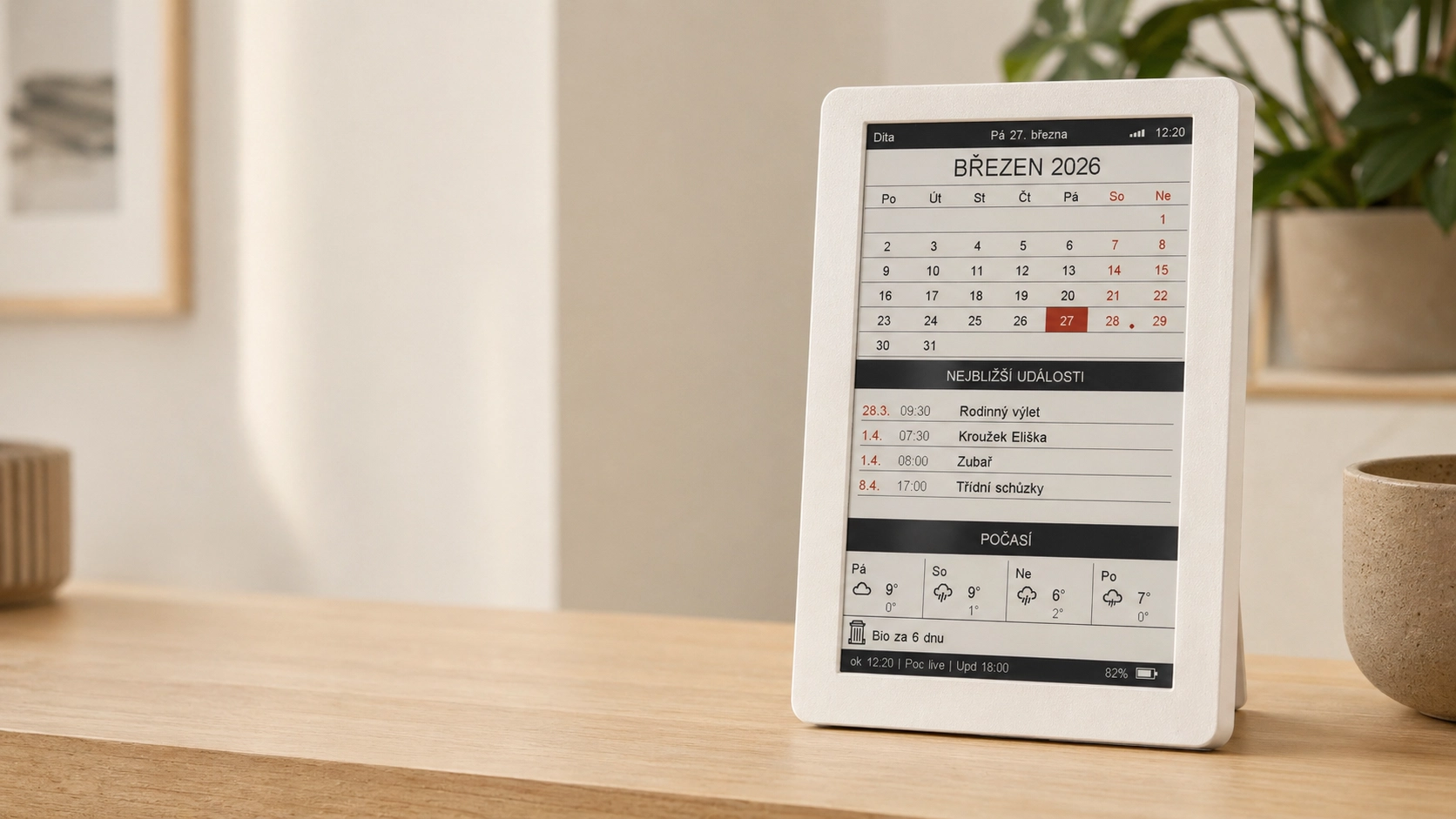

A family calendar
that is always
in sight.
Inkora combines the calm appearance of a paper calendar with automatic digital synchronization. Connect Google, Apple, or both, choose the calendars you want, and your family events stay up to date on your phone, on the web and on Inkora.
Inkora is a public DIY project. The printable parts and build information are available on Printables, while firmware installation stays simple through the browser-based installer.
Simple from the start
Print. Connect. Snap together. Install. Use.
I wanted a DIY project that does not require you to study electronics or embedded programming just to have a useful family calendar at home.
Print the enclosure
The enclosure is designed as a snap-fit construction. No screws, threaded inserts or glue are required.
Connect 3 components
The ready-made parts are connected using prepared connectors. No soldering or custom electronics are required.
Install setup firmware
Do it directly from a web browser. No Arduino IDE, PlatformIO, compiler or source-code work is needed.
Start using it
The setup firmware prepares the device and Inkora then downloads the current production firmware itself.
Only three main parts
Supported control board
LaskaKit ESPink 3.6 or Seeed Studio EE05 — generic ESP32/ESP32-S3 boards are not supported
Supported 7.5" e-ink display
Waveshare BWR 800 × 480 or GoodDisplay GDEM075F52
Battery
LiPo 6060100, 5000 mAh, 3.7 V, JST-PH 2.0 — the enclosure is designed for this size
No soldering. No glue. No screws. No coding.
Just build it and use it.
Shopping list
What exactly do you need to buy?
Choose one control board and one supported display. The battery and data-capable USB-C cable are common to both builds. The printed enclosure must match the selected board and display.
The availability labels describe the seller’s usual market reach, not live stock. Prices, shipping and stock can change. These are ordinary non-affiliate links.
Required components
Choose one control board
Seeed Studio XIAO ePaper Display Board EE05
1 pc · ESP32-S3 Plus · manufacturer part number 100057220
Required components
Choose one display
Waveshare 7.5-inch e-Paper (B)
1 pc · 800 × 480 · black, white and red · raw display without HAT · Waveshare SKU 13380
Good Display GDEM075F52
1 pc · 800 × 480 · black, white, red and yellow · raw 24-pin display
Required components
Add these components
LiPo 6060100 battery
1 pc · 5000 mAh · 3.7 V · JST-PH 2.0 · 100 × 60 × 6 mm
USB-C data cable
1 pc · it must support data transfer, not charging only
Printed Inkora enclosure
1 set · download the STL or prepared G-code variant for your board and display
Optional display-cable extension
The extension is not required for every build. If you need more room for routing the display cable, use the adapter together with one 24-pin, 0.5 mm-pitch FFC/FPC cable. For marketplace cables, also verify the contact orientation.
24-pin FFC/FPC adapter
1 pc · 24 pins · 0.5 mm pitch · joins the display flex cable to an extension cable
24-pin FFC/FPC extension cable
Choose one length · 6 cm, 10 cm or 20 cm · 0.5 mm pitch
Check the exact model before ordering
Marketplace results and seller listings can change. Similar-looking 7.5-inch displays may use a different resolution, controller, connector or color technology. Verify the exact part number and specifications before ordering. For the battery, verify 6060100 dimensions, JST-PH 2.0 connector orientation and wire polarity; never force a connector.
Why Inkora exists
One family calendar. Up to date everywhere.
Inkora started as a solution for our own home. We already use a shared digital family calendar, but not every member of the family has a phone or another smart device — especially children.
I wanted a calendar that anyone at home can simply look at and immediately see what is happening today and over the next few days.
At the same time, I did not want to copy the same information manually into a paper calendar.
One source of information
Phone → Web → Inkora
An event is entered only once in the shared calendar. If somebody changes the date or time, the updated information is synchronized everywhere.
Why e-ink
The calm of paper. The advantages of a digital calendar.
I did not want another visually aggressive glowing screen in our home.
E-ink looks much more like paper, has no traditional backlight and can naturally remain visible in a room all day.
Unlike a paper calendar, however, it updates itself automatically. We therefore do not need to maintain the same events manually in two places.
Does not glow
It does not feel like another television, tablet or phone.
Looks like paper
Information stays visible without the screen constantly demanding attention.
Updates itself
Changes in the family calendar do not need to be copied manually.
Low power consumption
E-ink mainly consumes power when the displayed content changes.
Battery operation
Currently more than 3 months per charge.
Inkora was designed from the beginning as a low-power device that does not need to remain permanently connected to a power cable.
In real everyday use at home, the current version already runs for more than 3 months on a single charge.
Development is continuing. I am still optimizing the firmware and synchronization process and will try to extend this interval further.
Real-world operation
Actual battery life can vary depending on the battery, Wi-Fi conditions, synchronization frequency and other operating conditions.
Reasonable cost
Why should a simple e-ink calendar be so expensive?
When I looked at similar ready-made devices online, I was surprised by how expensive many of them were.
I did not believe that a device essentially built around an e-ink display, a supported ESP32-S3 control board, connectivity, firmware and a simple enclosure had to cost that much.
The goal of Inkora is therefore not to build the absolute cheapest possible device, but to achieve a sensible balance:
quality hardware + simple construction + useful software + reasonable price
using the recommended components
as of August 2026
The exact price depends on the seller, shipping and the filament used.
Your calendars
Google, Apple, or both.
Connect an account and then choose only the specific calendars you want Inkora to display.
Google Calendar
Connect your Google account through a simple authorization flow. You do not need to create your own Google API project or manually enter API keys.
Apple / iCloud
Connect Apple calendars using an app-specific password created in your Apple account.
Everything together
You can connect Google, Apple, or both at the same time, then select one or more calendars from each account.
Family + personal + work + children’s activities?
Choose exactly the calendars you want. Inkora combines their events chronologically into one shared overview.
What Inkora can do
Useful information in one place.
Not another technical gadget, but a practical household overview.
Monthly calendar
A monthly overview with days containing events marked directly in the calendar.
Event dots
At a glance you can see which days already contain planned events.
8 upcoming events
Date, time and title of the nearest events from all selected calendars.
4-day weather forecast
A quick weather overview in Celsius or Fahrenheit.
Up to 6 waste schedules
Custom names, starting dates and intervals from 1 to 366 days.
Regional holidays and name days
Holidays and name days are displayed according to the selected region and device localization.
Offline cache
If Wi-Fi is temporarily unavailable, Inkora can continue showing the last stored events and weather data.
Wi-Fi and sync status
The display makes it possible to quickly see connection and synchronization status.
Battery status
Inkora displays battery status and currently achieves more than 3 months of normal operation per charge.
Remote firmware updates
Firmware can be updated without opening the enclosure and without manually flashing it again from a computer.
Diagnostics
Status and diagnostic information helps identify possible operating or synchronization problems.
Time and date formats
Automatic time-zone suggestion, Monday or Sunday week start, 12/24-hour time and selectable date order.
Quiet hours
Optionally skip automatic Wi-Fi, synchronization, updates and display refreshes overnight.
Languages & regions
9 language variants and 10 regional data packs, including US English and US federal holidays.
Privacy and security
No intermediary Inkora calendar server.
One of the goals was to avoid adding another unnecessary cloud service between your calendars and your device.
The Inkora device communicates with the required services itself. Calendar events therefore do not need to pass through a central Inkora server that collects users’ calendar data.
Security therefore primarily depends on your Google or Apple account, your home Wi-Fi network and the physical device itself.
Inkora only reads your calendar.
Calendar access is read-only. Inkora does not have permission to create, modify or delete calendar events.
The principle is simple: do not create another central store of calendar data when the device does not need one.
Everyday use
Inkora runs in our own home.
Inkora is not just a technical demonstration. My own family actually uses it.
That means even family members without their own smart device can see what is coming up. The calendar is simply always visible.
It is also an important reason why I plan to keep developing and maintaining the project long term.
If something stops working, I have the same problem at home.
That gives me a very practical reason to keep synchronization, firmware and the overall project working in the future.
A real device
The project is no longer just an idea.
The current Inkora synchronizes selected Google and Apple calendars, combines their events and displays a monthly calendar, 8 upcoming events, a 4-day weather forecast, regional holidays and name days, up to 6 custom waste schedules, Wi-Fi, synchronization and battery status. During a temporary connection outage it uses the last stored events and weather data.


Project development
Inkora keeps moving forward.
Firmware 1.1.7 adds two supported control-board variants, US English and new regional packs, automatic time-zone suggestions, selectable week/date/time/temperature formats, up to six custom waste schedules and quiet hours.
Power consumption is also being continuously optimized. Inkora now exceeds 3 months per charge in real use, and I will continue trying to extend this interval.
Further development focuses mainly on stability, simpler first-time setup, lower power consumption and features that are genuinely useful in everyday life.
Public DIY project
Everything you need to build your own Inkora is public.
Inkora is published as a DIY project designed so that even somebody without electronics experience can assemble it.
The project includes:
- ✓ 3D enclosure models
- ✓ links to the exact components
- ✓ assembly instructions
- ✓ visual connection and enclosure guide
- ✓ browser-based firmware installer
- ✓ first-time setup guide
No electronics schematic to study.
The guide is practical and visual: how to insert the display flex cable correctly, where to connect the battery to the supported control board, how to place the components into the correct enclosure variant and how to snap everything together.
The project is available now on Printables.
The 3D models and project documentation are available under the project license shown on Printables.
The enclosure is split so it can be printed on a build plate from 180 × 180 mm, including compact printers such as Prusa MINI-class machines.
Firmware is distributed separately.
Inkora firmware is not open source. Source code is not part of the public release. Compiled firmware is provided free of charge for personal, non-commercial use with Inkora. Commercial use, sale, commercial redistribution, inclusion with commercially offered devices, or re-hosting and redistribution of the firmware files requires prior written permission from the author. Firmware should be downloaded only from the official Inkora distribution or installer.
What is public — and what is not
Inkora is a public DIY project, but that does not mean every part of it is open source.
Public
Assembly guide, component list and project documentation
Public
3D enclosure models for non-commercial use
Available to users
Browser installer and compiled firmware for personal, non-commercial use
Not public
Firmware source code
Long-term support
Development does not end with publication.
Inkora is not a one-off project created only to upload it to the internet. I use it with my own family, so I have a direct reason to keep it working.
If Google, Apple or another required service changes, it also affects the device used in our home. That is another reason why I expect to maintain the firmware over time.
New functions and improvements may gradually be added, but the core philosophy should stay the same:
Do not make simple things unnecessarily complicated.
A new feature should not require another server, complicated setup or another technical obstacle unless it is genuinely necessary.
Project author
Inkora is not made by a large company.
My name is Vojtěch Sejkora. Inkora originally started as a solution for our own family and gradually became a project I want to make available to other people as well.
I like simple solutions. That is why the device uses ready-made components, requires no soldering and does not require users to compile firmware manually.
I develop and use the project at the same time, so new features can be tested in real everyday family use rather than only on a workbench.
Support the project
Do you like Inkora?
I develop Inkora in my free time. If you like the project and want to help it grow, you can support development through Ko-fi. Contributions help cover test hardware, displays, batteries, prototypes, web hosting, documentation, translations and continued firmware development.
Support is completely optional. Inkora is not based on a subscription or paid feature unlocks — you can build, install and use it without making a contribution.
Development with less noise
Ideas, votes and bug reports in one place.
Vote for features you want instead of creating duplicates. If something breaks, send a structured report and paste Inkora diagnostics directly into it.
Enter it once.
Keep it current everywhere.
A calm family e-ink calendar that you can build yourself without soldering or programming.